"Just add a play button."
That was the feature request. The product was smry.ai, an article reader serving 25,000+ daily active users and 583,000+ monthly actives. Users paste a URL, get a clean, distraction-free article. Simple.
Adding text-to-speech should have been simple too. Call a TTS API, get audio, stream it back. Maybe a weekend project.
It ended up being 900+ lines of server-side audio engineering, a custom MP3 frame parser, three tiers of caching, bounded concurrency control, and a deep dive into why iOS Safari interprets Xing VBR headers differently than every other browser on the planet.
Here is every decision I made, what broke along the way, and what I would do differently.
The problem space
Before writing any code, I mapped the constraints:
- 25K DAU. Not a toy project. A bad TTS implementation would either crash the server or bankrupt us on API costs.
- Articles are long. A 5,000-word article generates ~20 minutes of audio (~15MB at 64kbps). At 100 concurrent requests, that is 1.5GB of in-flight audio buffers on a 4GB server.
- Users expect instant playback. TTS APIs have latency. A 5,000-word article might take 15 to 30 seconds to fully synthesize. Nobody waits that long.
- Mobile is half the traffic. Mobile browsers have their own opinions about audio playback.
- Budget matters. TTS APIs charge per character. At scale, the difference between $5/1M chars and $30/1M chars is the difference between a feature that pays for itself and one that eats your margins.
The naive implementation (send full text, get full audio) fails on every single one of these constraints.
The architecture: three-tier caching + bounded concurrency
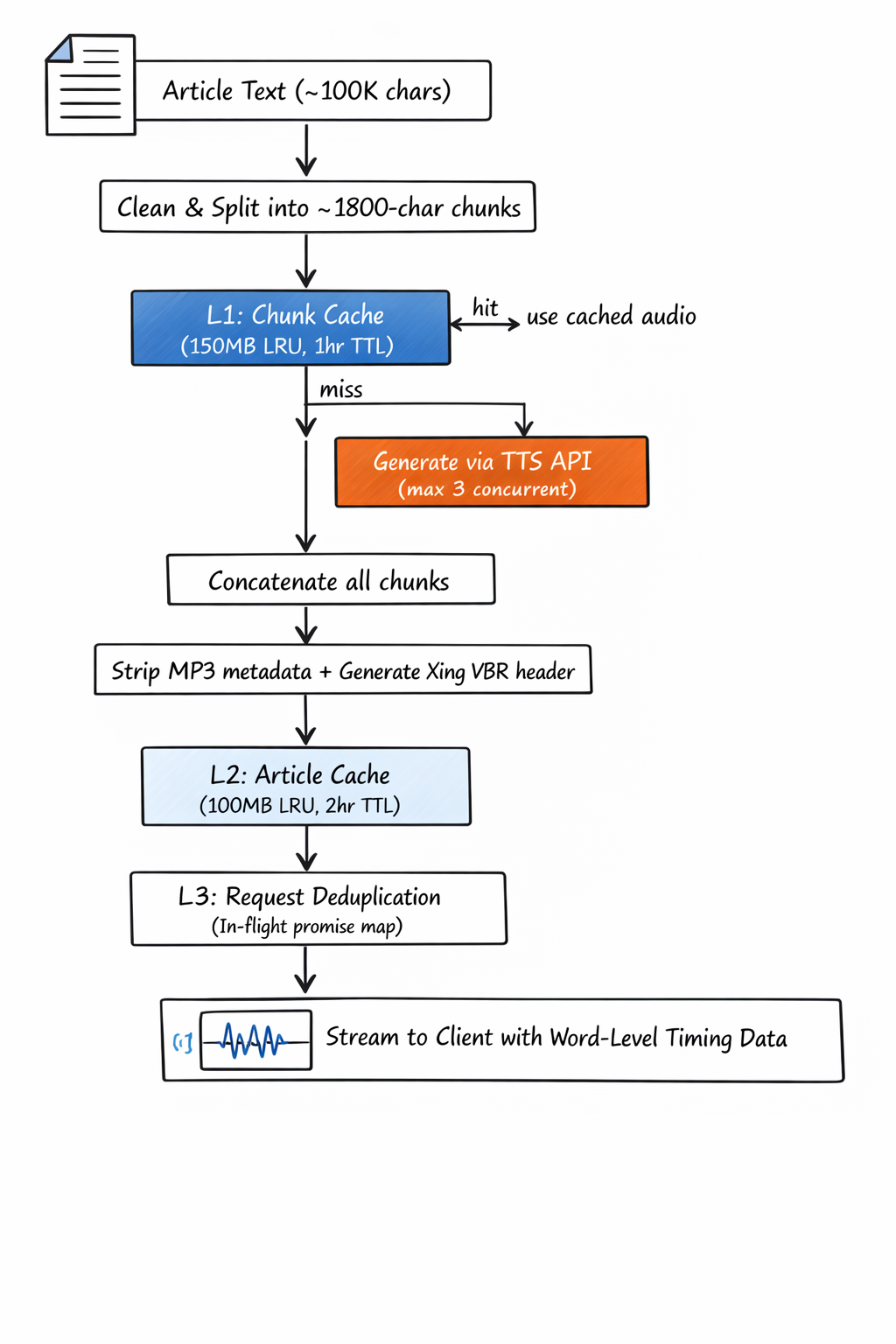
The system splits articles into ~1,800-character chunks, generates audio for each chunk independently, then concatenates the results. This chunking is the foundation everything else builds on.
Layer 1: per-chunk caching
Each chunk gets its own cache entry, keyed by SHA-256(version + text + voiceId). The cache is a bounded LRU with a 150MB cap and 1-hour TTL.
Why per-chunk instead of per-article?
Because articles share content patterns. More importantly, partial cache hits are powerful. If 8 out of 10 chunks are cached, you only make 2 API calls instead of 10. For long articles, this regularly cuts generation time by 60 to 80%.
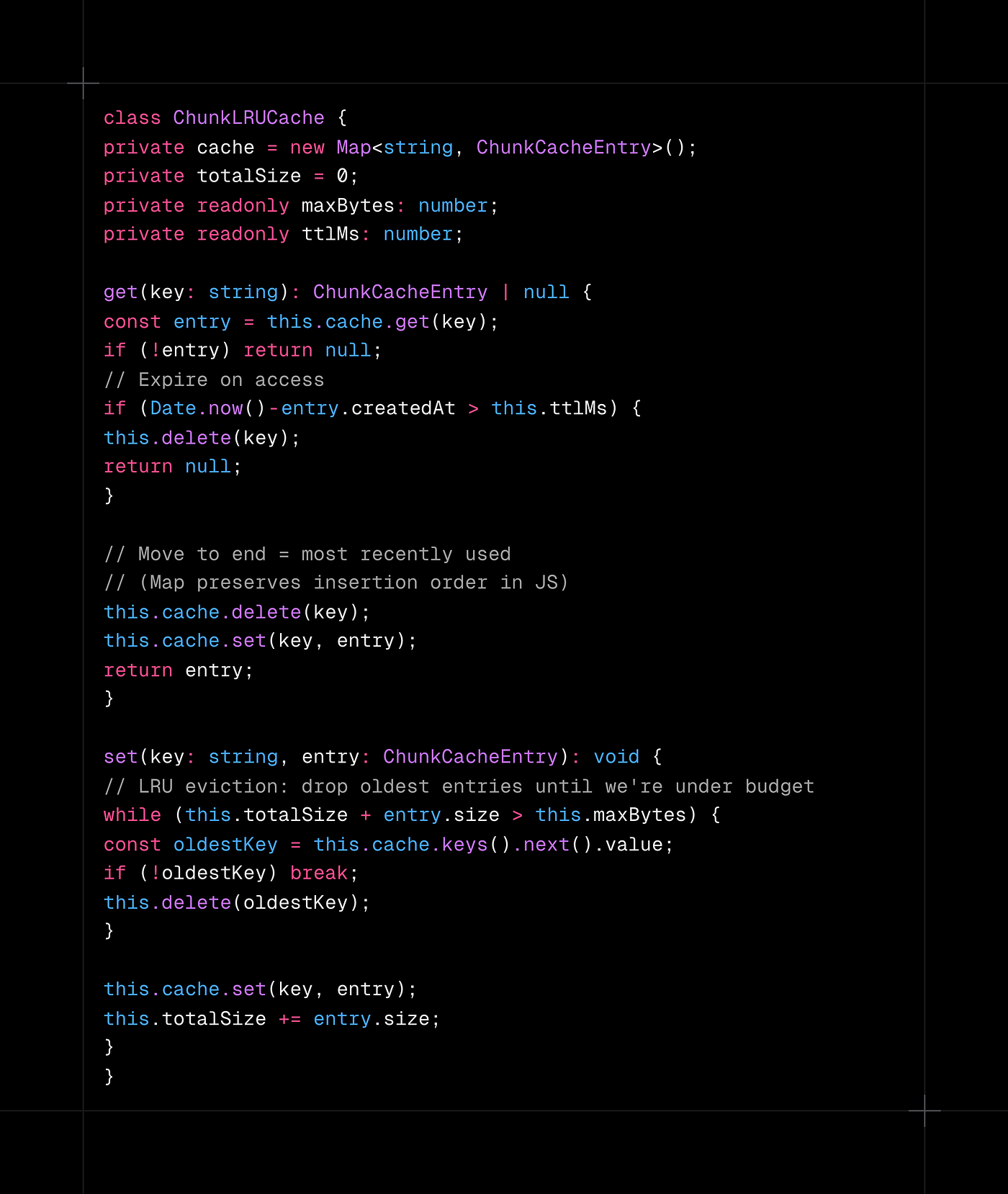
The trick: JavaScript's Map insertion order works as an implicit LRU queue. Delete and re-insert on access moves an entry to the "most recently used" position. No separate linked list needed.
Cache key versioning
The cache key includes a version prefix (v3 currently). When the chunking algorithm or audio processing changes, bumping the version invalidates all stale entries without a cache flush:
- v1: Original chunking
- v2: Switched to MP3 frame-based duration calculation (fixed alignment drift)
- v3: Xing VBR header fix (invalidates old concatenated audio)
This pattern is cheaper than a cache flush and safer than hoping old entries are "close enough."
Layer 2: article-level caching
The second cache stores the fully merged audio plus word alignment data for complete articles. Key: SHA-256(cleaned_full_text + voiceId). 100MB cap, 2-hour TTL.
Why a second cache if chunks are already cached?
Because even with cached chunks, you still pay for:
- Looking up 10+ chunk keys
- Concatenating buffers
- Stripping MP3 metadata from chunks 2+
- Generating a Xing VBR header
- Merging word alignment timings
For a re-listen (same article, same voice), the article cache serves the complete response in one lookup with zero processing. At 25K DAU, popular articles get replayed constantly. This cache turns repeat requests from ~200ms of processing into ~2ms.
Layer 3: request deduplication
When a trending article goes viral, 50 users might hit "play" within the same second. Without dedup, that is 50 identical API calls generating the same audio simultaneously.
The fix is a simple in-flight promise map:
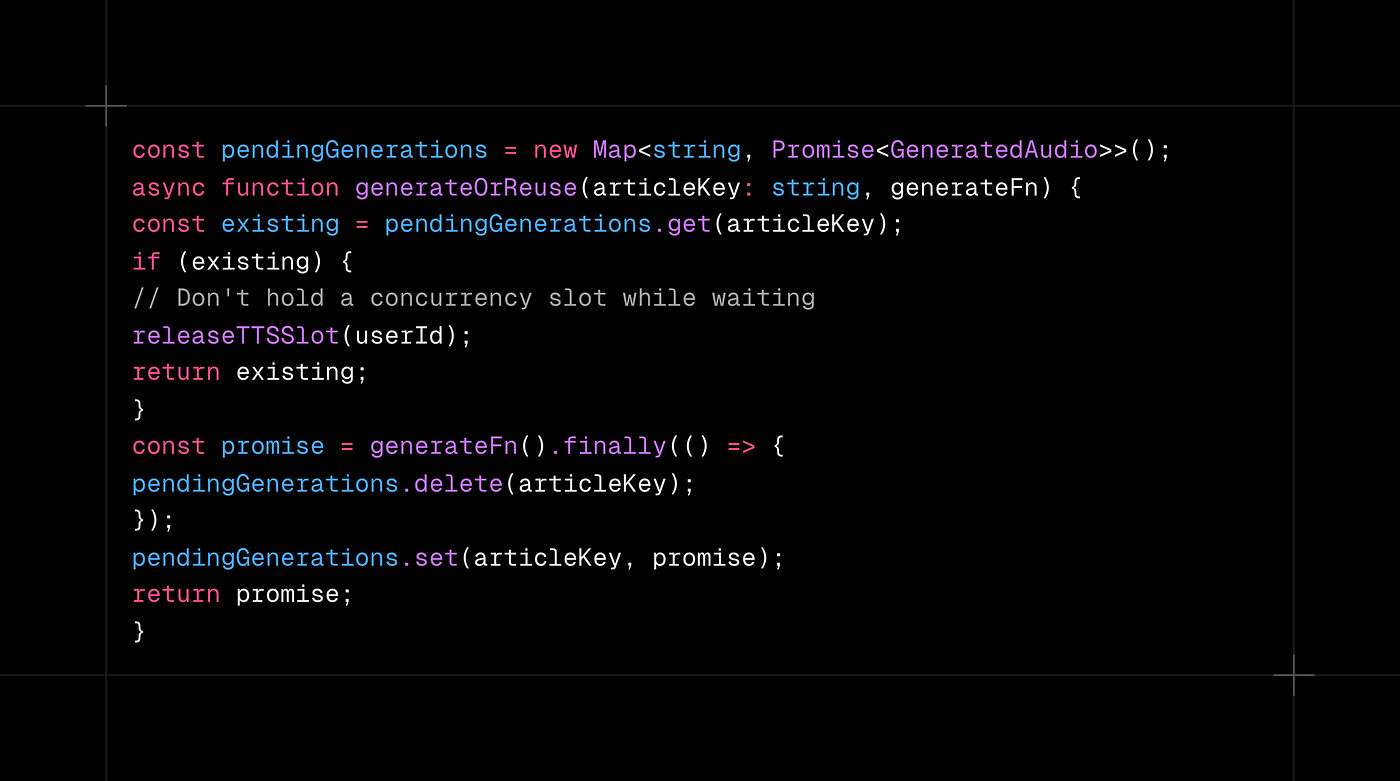
The critical detail: release the concurrency slot before awaiting. If you hold the slot while waiting for someone else's generation to finish, you block other users for no reason. Fifty users, one API call, one slot used, fifty responses served.
This single optimization is the highest-ROI code in the entire TTS system.
Bounded concurrency: the part everyone skips
Caching handles repeated requests. Concurrency control handles the thundering herd.
The system enforces three limits:
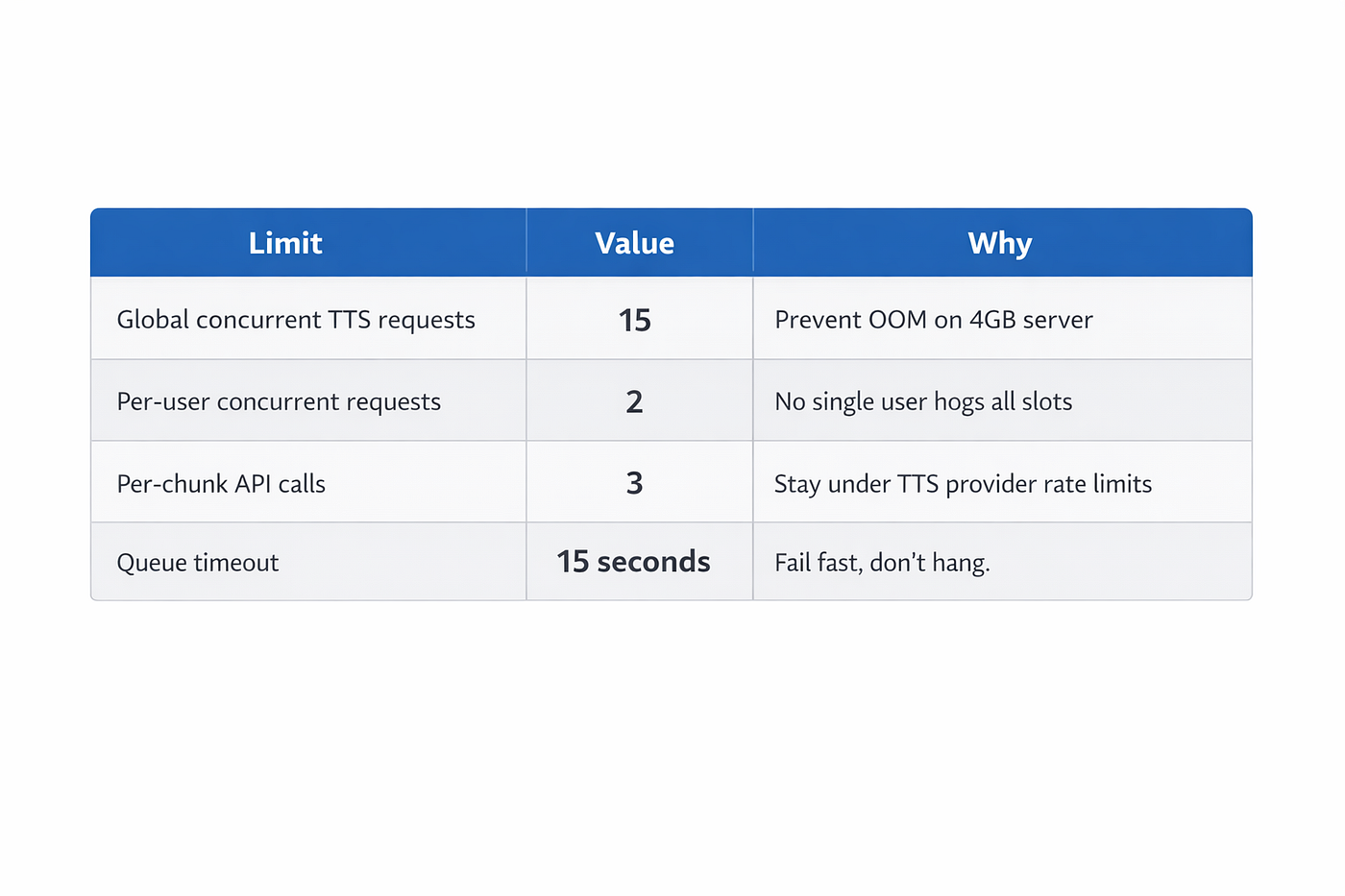
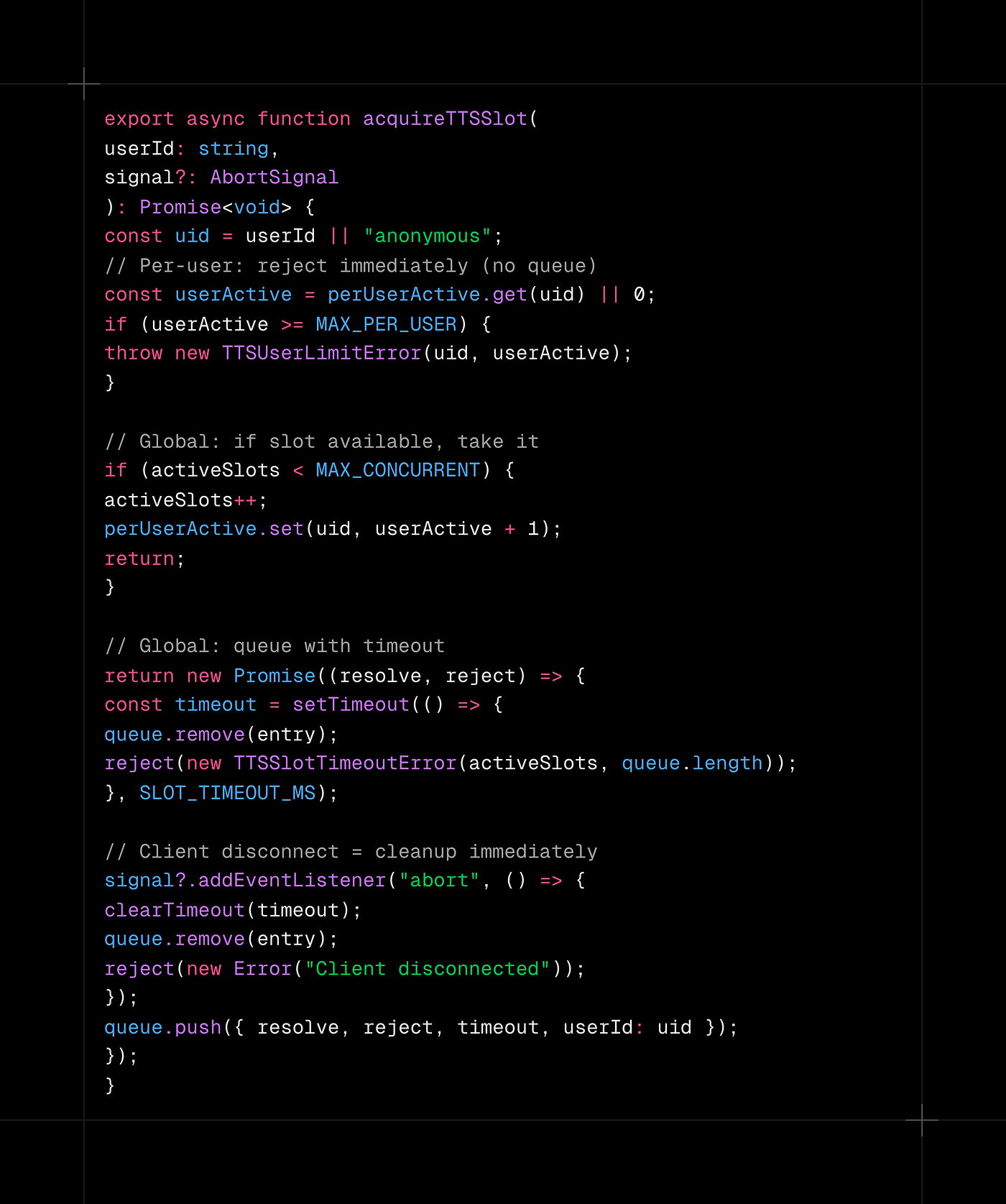
The AbortSignal propagation is crucial. It flows from the HTTP request all the way down to the TTS API fetch() call. When a user navigates away mid-generation, the API call cancels immediately. No wasted compute, no wasted money, no zombie slots.
Without bounded concurrency, a traffic spike from a viral article means 200 concurrent TTS requests, rate limits from the provider, 1.5GB of buffers, and a server restart. With it, excess requests queue for up to 15 seconds and get a clean 503 if the system is genuinely overloaded. Users see "TTS service is busy, try again shortly" instead of a blank error page.
The iOS Safari bug that changed everything
Everything worked in Chrome, Firefox, and Android. Then I tested on an iPhone.
The symptom: audio plays for about 30 seconds (roughly one chunk), then the player shows "ended." But audio keeps coming out of the speaker. The scrub bar freezes. The word highlights stop advancing. The duration shows "0:30" for a 10-minute article.
I spent an embarrassing amount of time thinking this was a React state bug.
The actual root cause: MP3 file format metadata.
When you concatenate MP3 chunks, each chunk carries its own headers. The ID3v2 tag holds metadata (title, artist). The Xing/Info frame holds encoder metadata including total frame count and total byte count.
iOS Safari reads the Xing header from the first MPEG frame it encounters. It uses the "total frames" field to calculate duration. When that field says "83 frames" (one chunk), Safari thinks the entire stream is 30 seconds long, even though 9 more chunks of audio follow it.
Chrome ignores Xing headers and calculates duration from the actual stream length. Safari trusts the metadata. Both behaviors are technically valid per the MP3 spec. The spec just never anticipated concatenated chunks.
The fix: MP3 frame surgery
Two steps.
Step 1: strip all metadata from chunks. Every chunk gets its ID3v2 tags and Xing/Info/VBRI frames removed before concatenation:
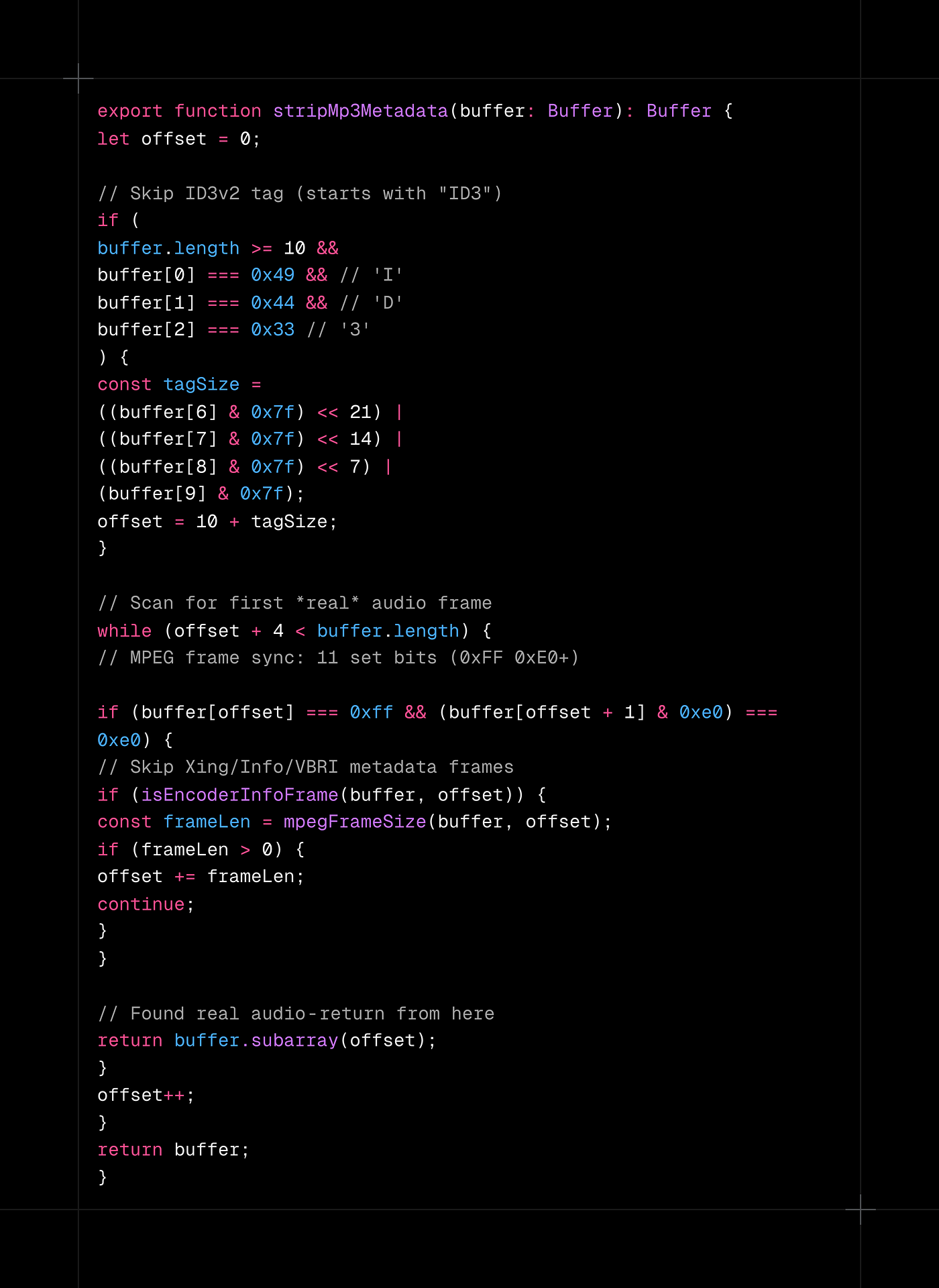
Note: buffer.subarray() instead of buffer.slice(). It returns a zero-copy view into the same memory, important when you are processing dozens of audio buffers and do not want to double your allocation.
Step 2: generate a correct Xing header for the full stream. After stripping metadata from all chunks and concatenating them, prepend a single Xing frame with the correct total frame count and byte count:
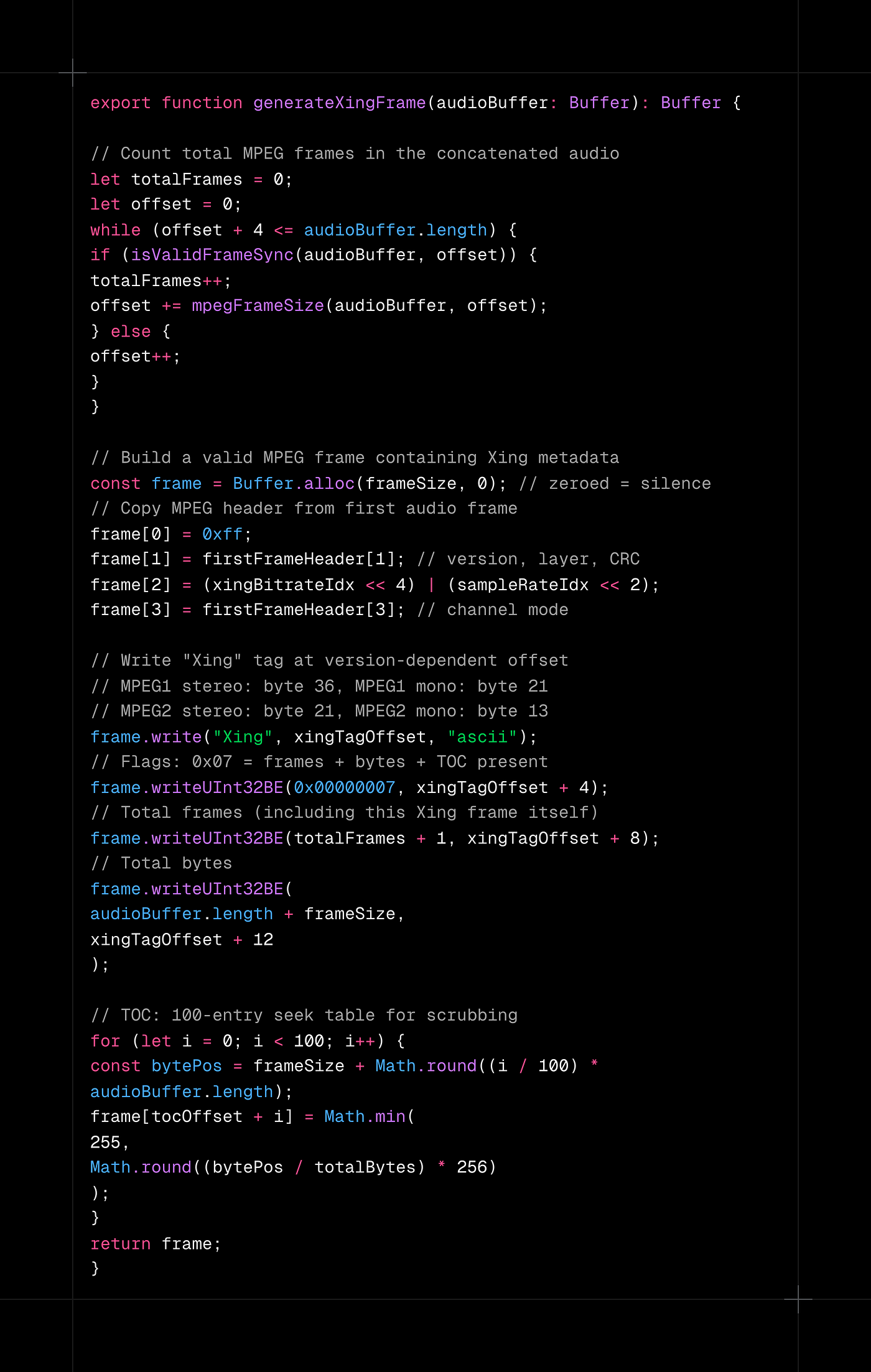
Why "Xing" and not "Info"? Both are valid markers, but iOS Safari has had bugs where "Info" frames (intended for CBR streams) are not processed correctly. "Xing" (intended for VBR) works reliably across all versions I tested.
The TOC (Table of Contents) matters too. It is a 100-entry seek table that maps percentages to byte offsets. Without it, scrubbing on iOS jumps to wrong positions because the browser cannot calculate byte offsets for VBR audio.
Duration calculation: another subtlety
Before this fix, I calculated audio duration from the last word boundary's end time. This works for single chunks but drifts on concatenated audio because each chunk has trailing silence or padding that the word boundaries do not account for. After 5 chunks, the highlights run 2 to 3 seconds ahead of the audio.
The fix: parse actual MPEG frames to get exact duration:
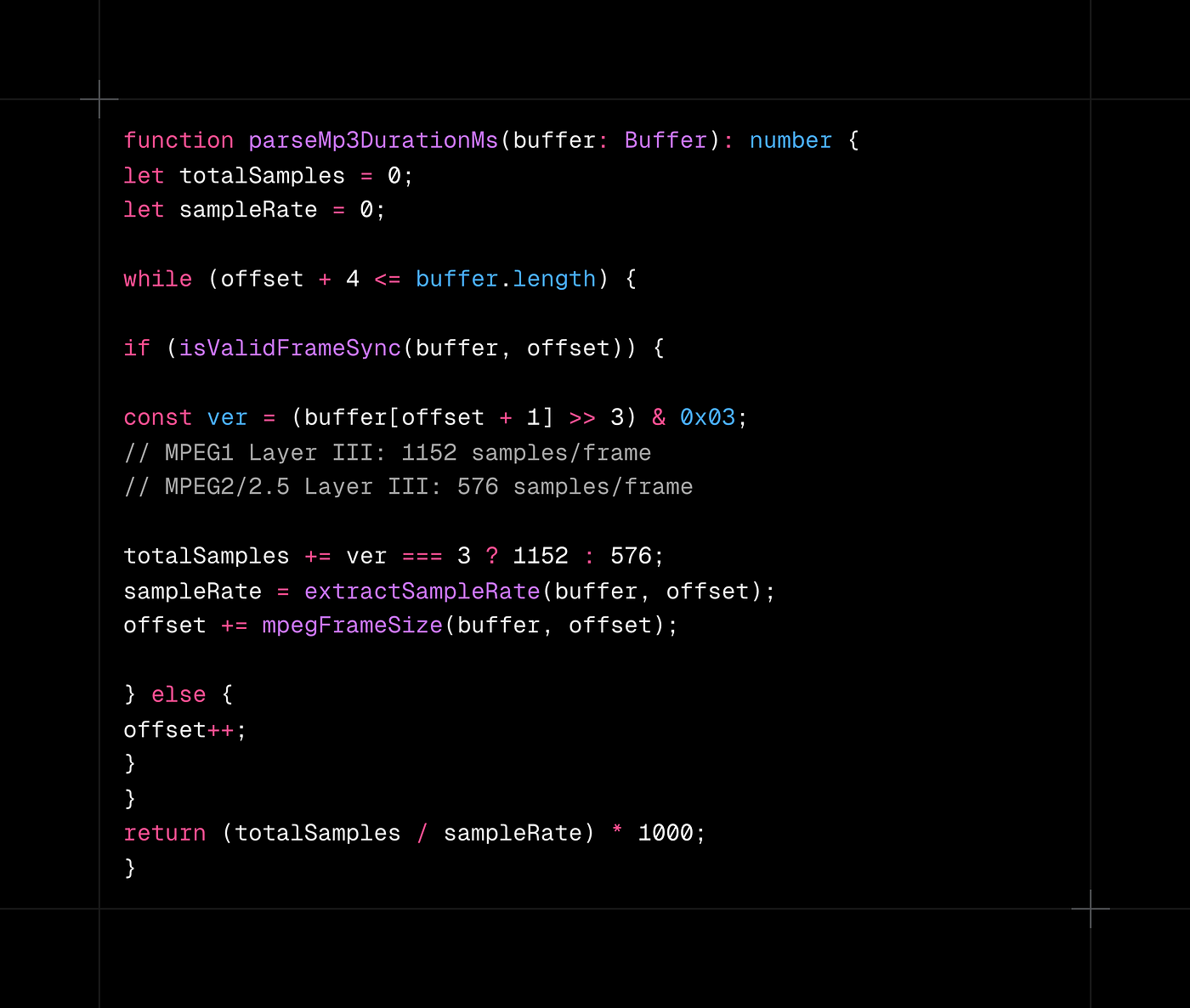
This gives frame-accurate duration regardless of VBR bitrate changes across chunks. The word-level highlights now stay perfectly in sync for 20+ minute articles.
Word-level highlight tracking
TTS without synchronized text highlighting feels like a podcast. With it, it feels like a reading assistant. This was the most complex client-side piece.
Character-to-word conversion
The TTS provider returns character-level timestamps. I convert these to word boundaries for the UI:
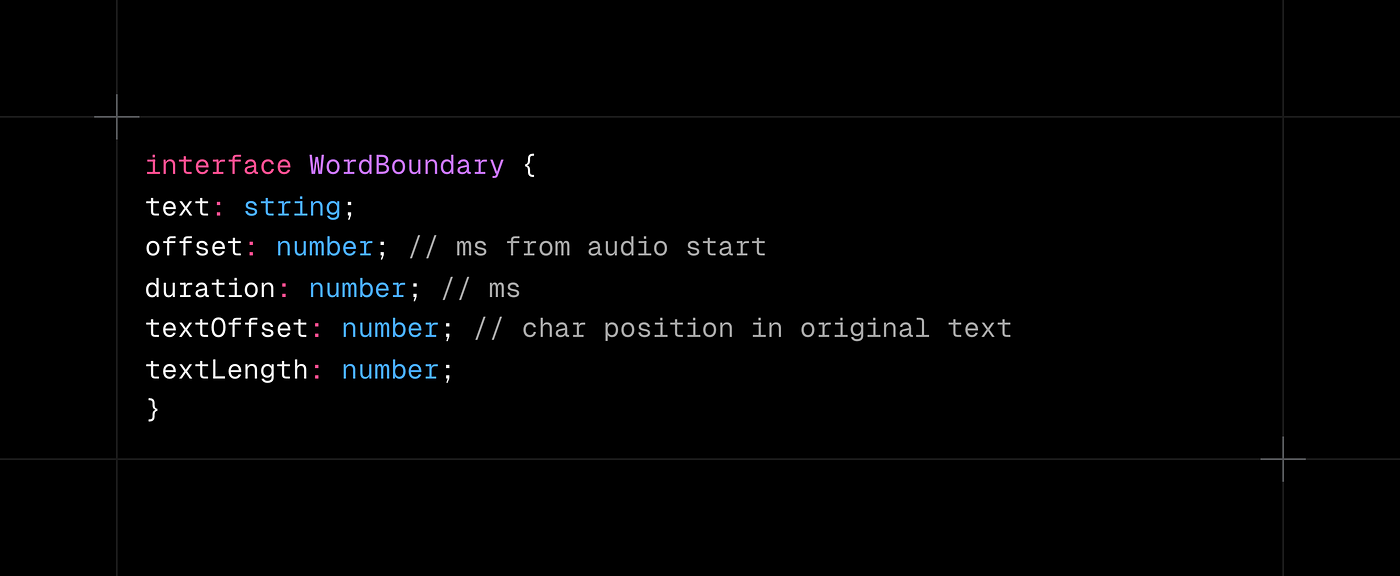
The conversion groups consecutive non-whitespace characters into words, using each word's first character start time and last character end time.
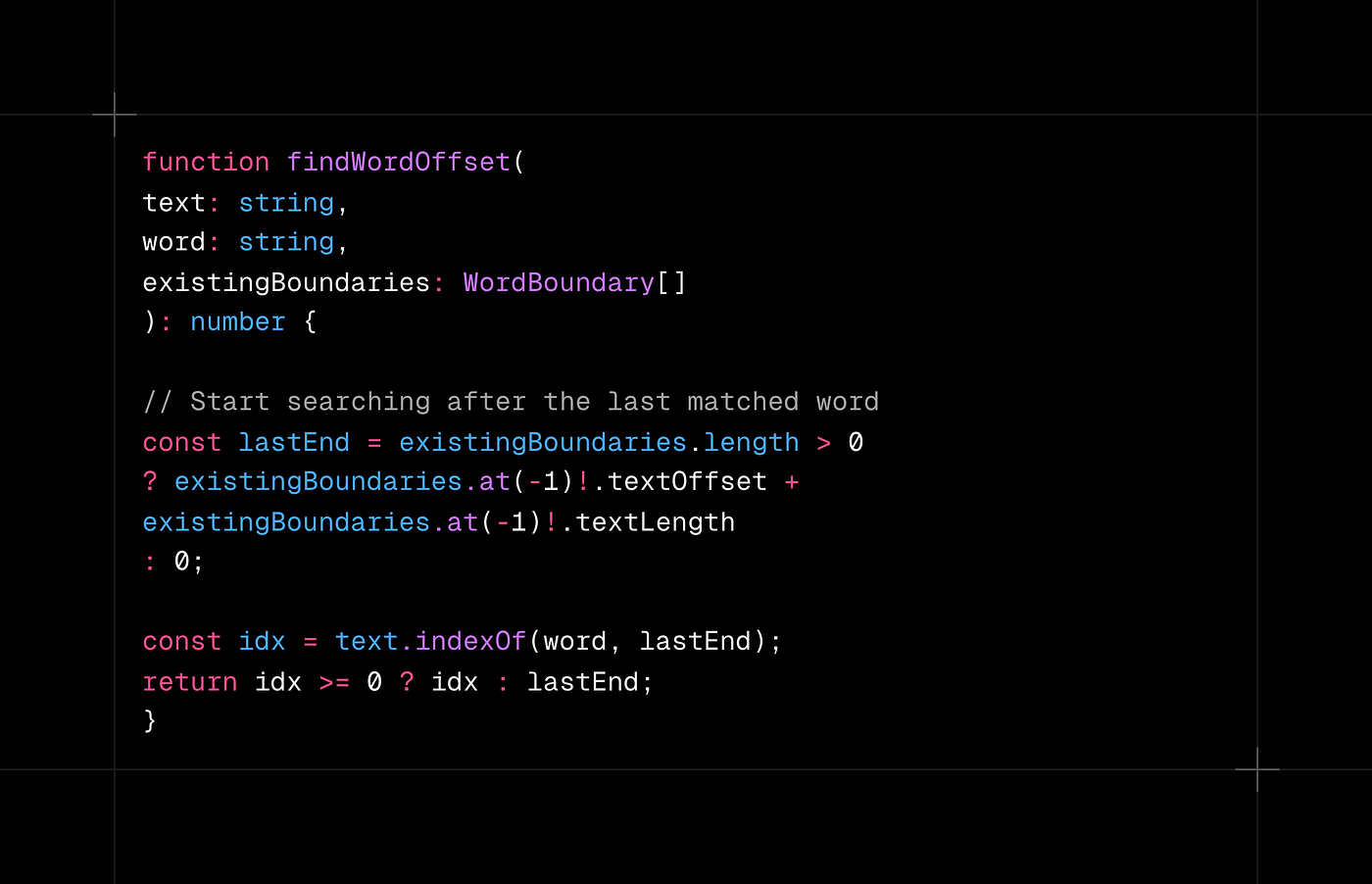
The non-obvious part: handling repeated words. The word "the" appears 50+ times in any article. A naive text.indexOf("the") always matches the first occurrence. Instead, I use forward-search from the last matched position:
Merging alignments across chunks
Each chunk generates its own alignment timeline starting from 0. When merging, I offset each chunk's timestamps by the cumulative duration of all previous chunks:
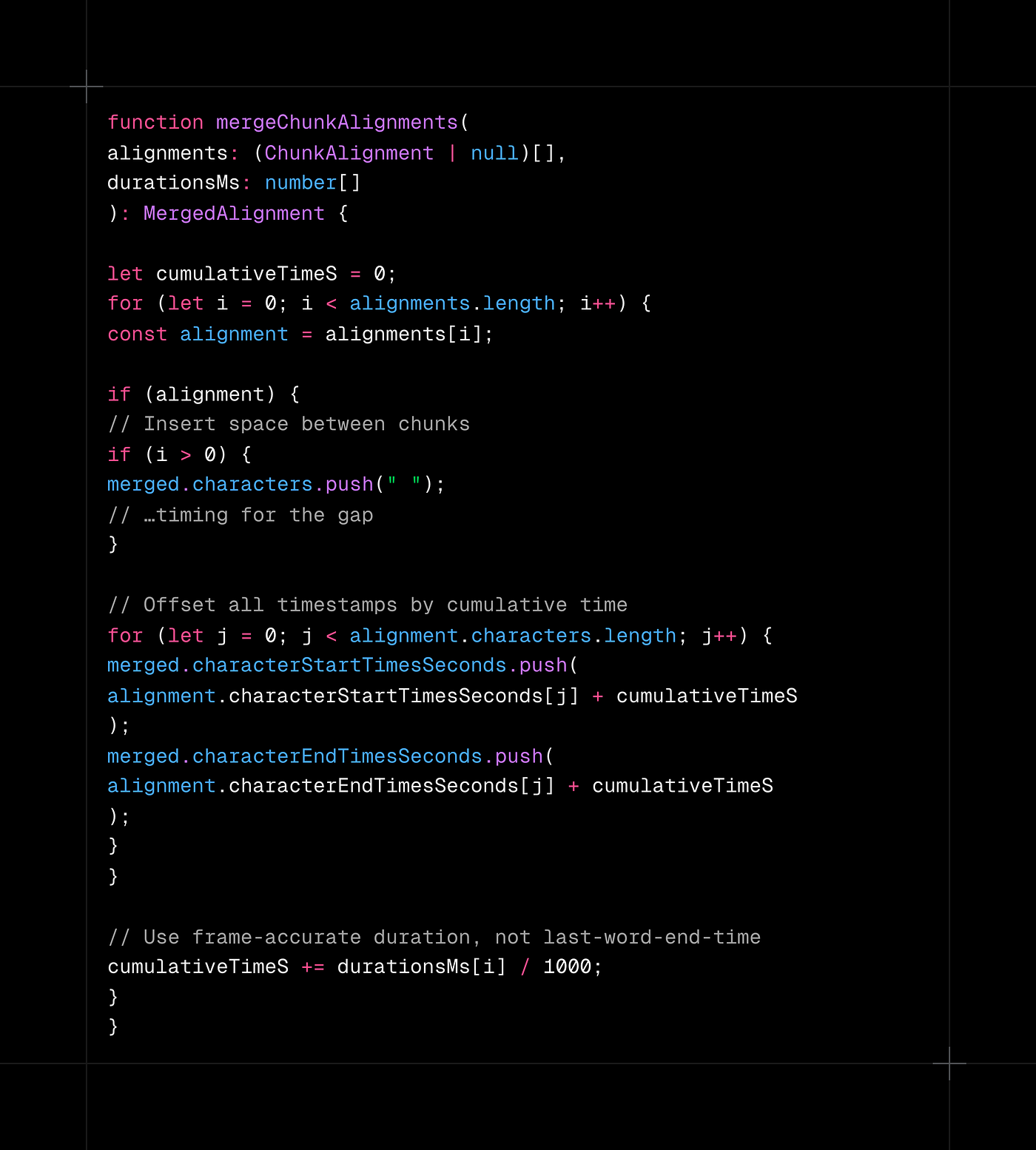
Using the frame-parsed duration (not the last word's end time) is critical. The trailing silence in each chunk is real time that passes. Skip it and the highlights drift forward at every chunk boundary.
The three-headed sync monster
On desktop, requestAnimationFrame gives smooth 60fps highlight updates. On mobile, it is not enough.
At MP3 chunk boundaries, mobile Safari sometimes fires a spurious "ended" event. RAF stops because the audio appears paused. timeupdate events stop firing. But the pre-decoded audio buffer keeps playing through the speaker. The user hears audio with no visual feedback.
The fix required three separate sync mechanisms:
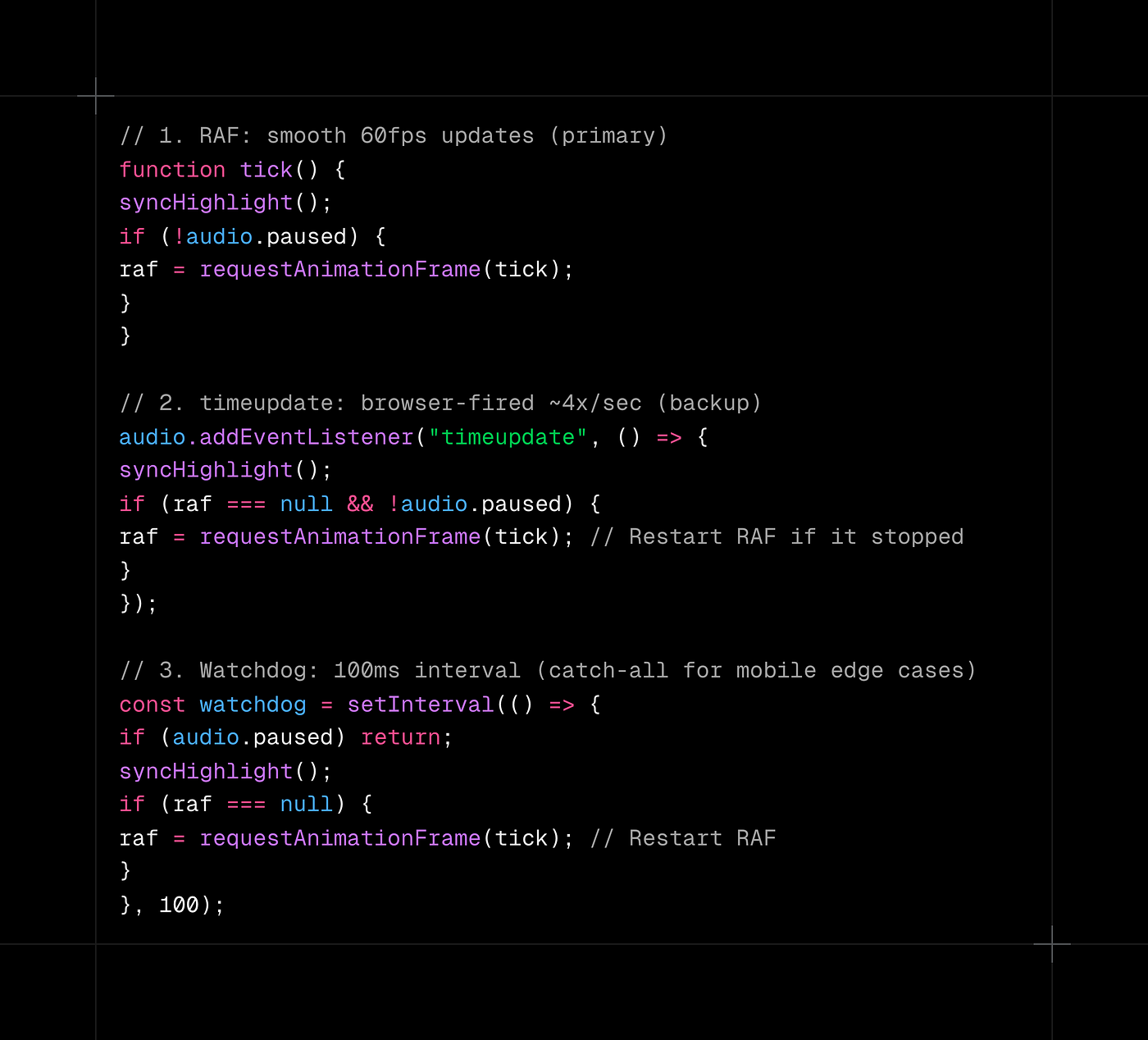
Three sync sources is not elegant. But it works on every device and browser I have tested, including the iPhone SE running iOS 16 that exposed the original bug. Sometimes the right solution is a belt, suspenders, and a safety pin.
User scroll independence
When TTS is playing and the user manually scrolls to a different part of the article, auto-scroll should stop rather than fight for control. When they tap "scroll to current," it should smoothly return to the highlighted word.
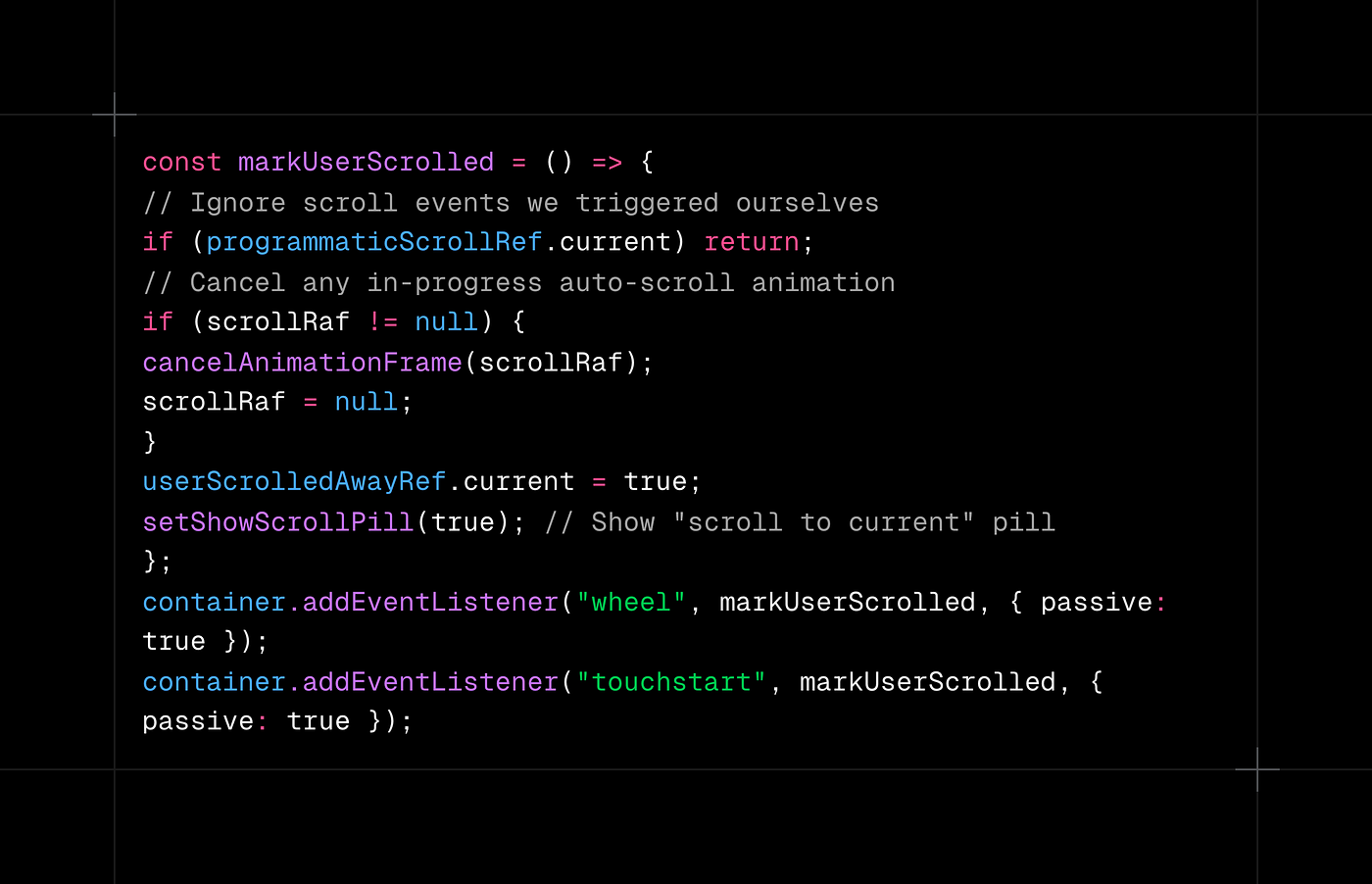
The programmaticScrollRef flag distinguishes user scrolls from programmatic ones. Without it, every auto-scroll triggers the "user scrolled away" state and creates an infinite loop.
Provider evolution
I did not start with the right TTS provider. The path:
- Azure Speech Service: high quality, WebSocket-based, but complex setup and inconsistent latency.
- Cartesia: faster iteration, but costs added up at scale.
- ElevenLabs: best voice quality, $15 to $30/1M chars. At 25K DAU, this was $600 to $1,800/month for TTS alone.
- Inworld AI: $5/1M chars, 100ms median latency, character-level timestamps. The winner.
The abstraction I built during the Cartesia-to-ElevenLabs migration made the ElevenLabs-to-Inworld switch almost trivial. The generateSpeechForChunk() interface stayed the same. Only the HTTP call and response parsing changed.
If you are integrating an external API, build the abstraction after your first provider switch, not before. You will know what actually varies vs. what you think will vary.
Memory management
On a 4GB server, TTS is the biggest memory threat. Each request can allocate 5 to 50MB of audio buffers. Without tracking, you find out about leaks when the health check restarts your server at 3 AM.
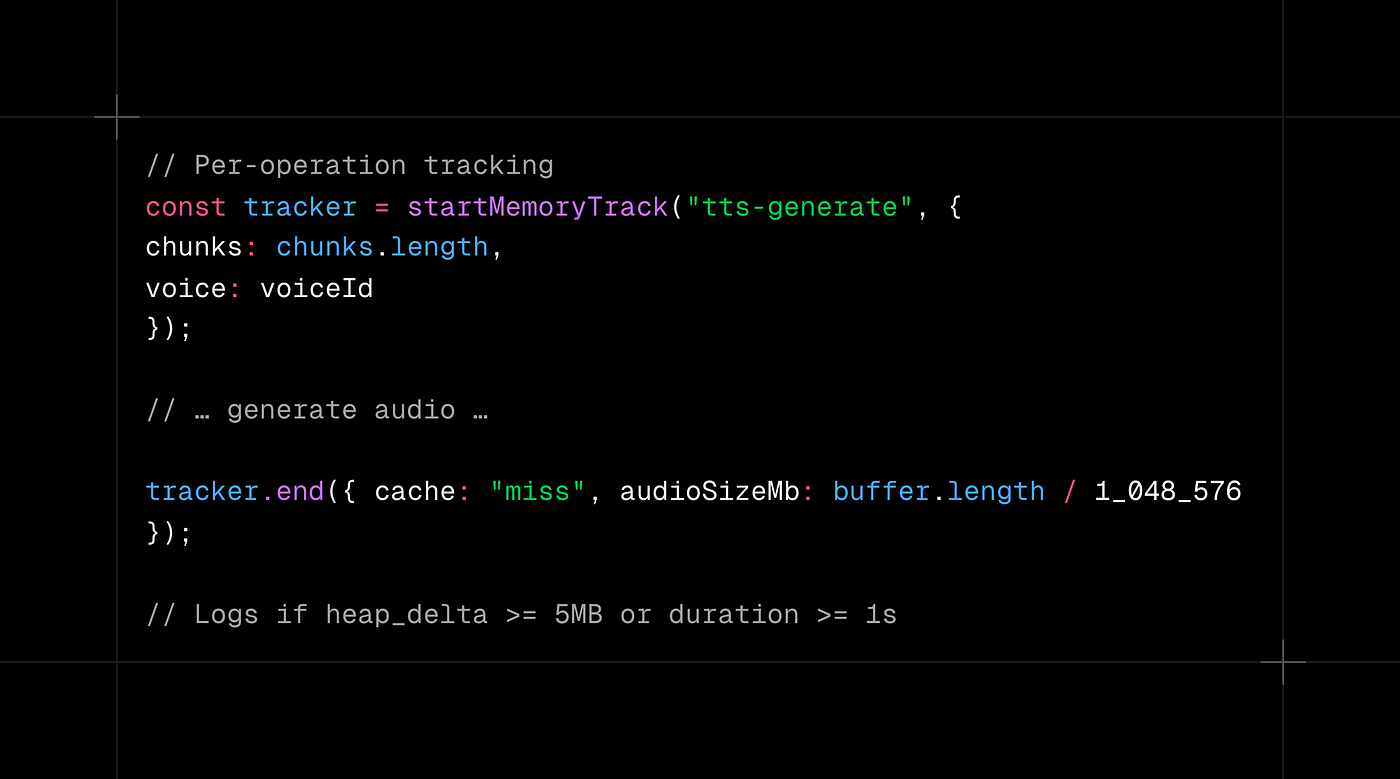
Periodic monitoring runs every 30 seconds and logs RSS snapshots. Alerts fire at:
- Warning: heap grew 20MB+ since last snapshot
- Error: RSS spike >400MB in 30 seconds
- Critical: RSS >1.5GB (health check will restart)
Explicit GC assistance after large operations:
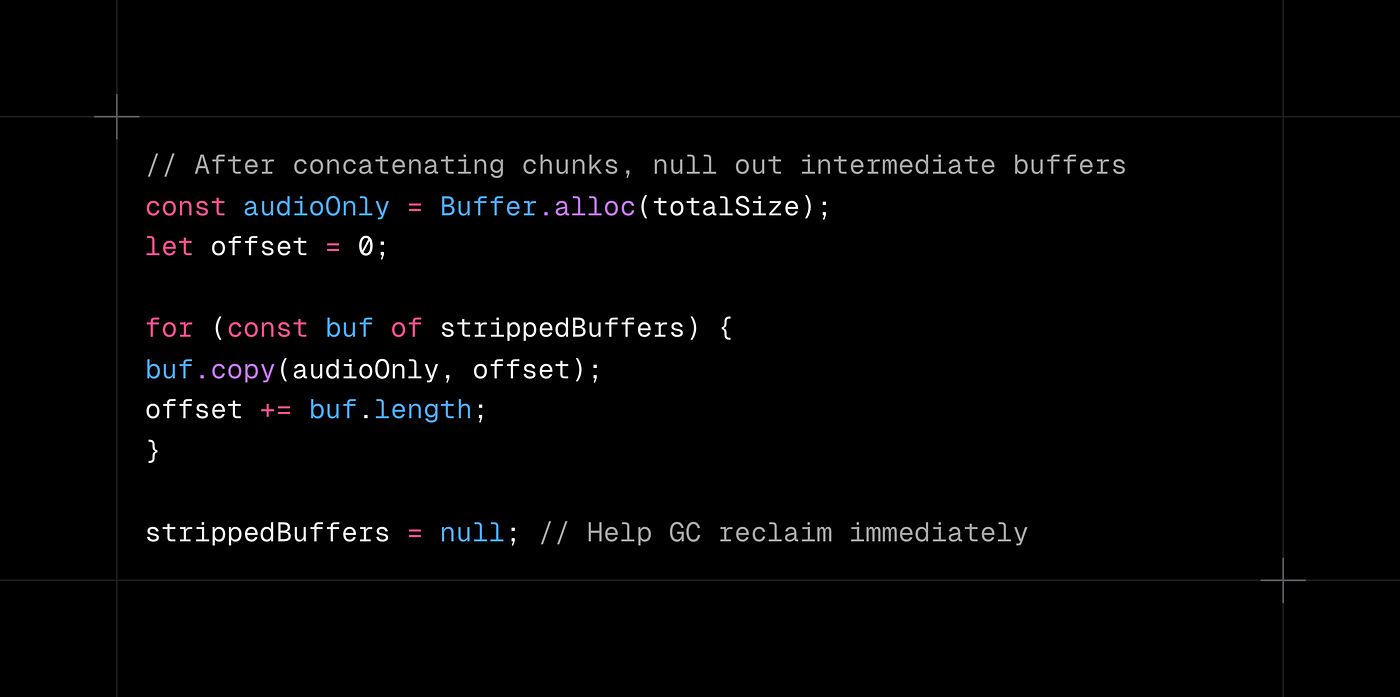
The cache stats are registered with the memory tracker and exposed via the /health endpoint:
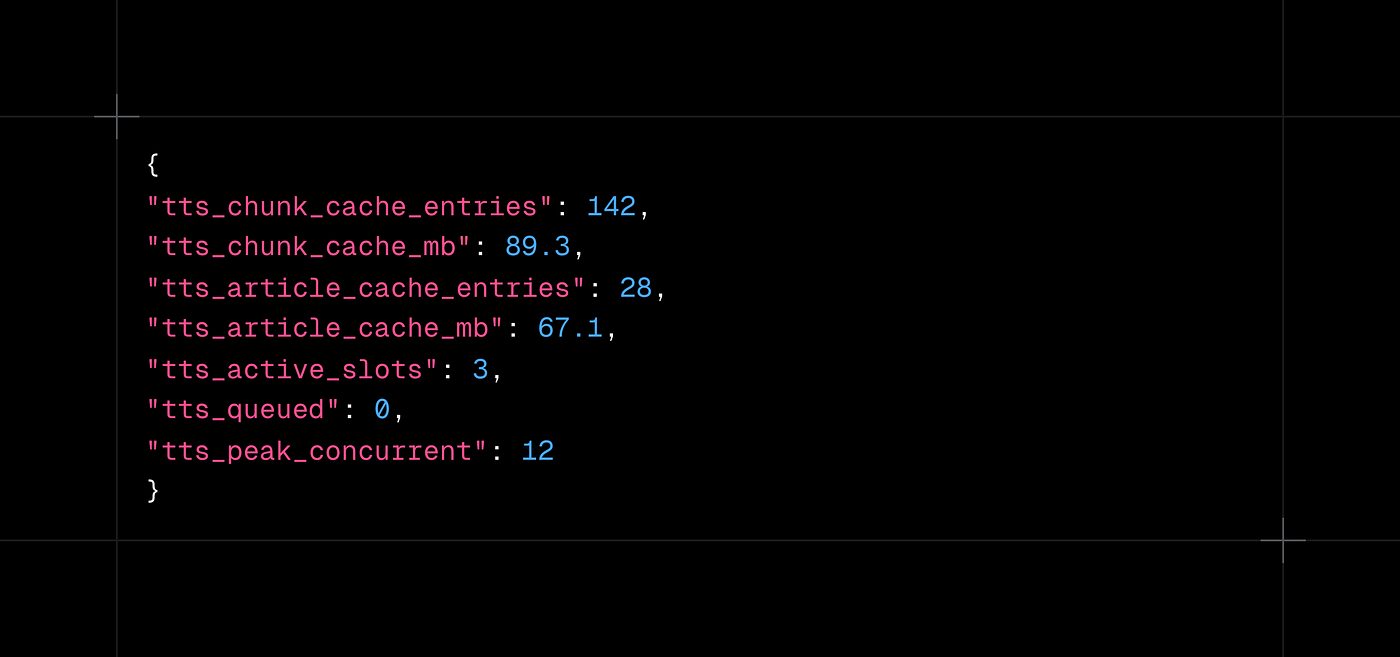
This is not glamorous code. But it is the difference between a system you can debug in production and one that fails mysteriously under load.
Text cleaning
Articles scraped from the web are not clean text. They contain "SKIP ADVERTISEMENT," "Share on Twitter," cookie consent text, and navigation labels. If you pass this through TTS, your user hears "Skip advertisement. Share this article on Facebook. Accept all cookies" in the middle of a paragraph about quantum computing.
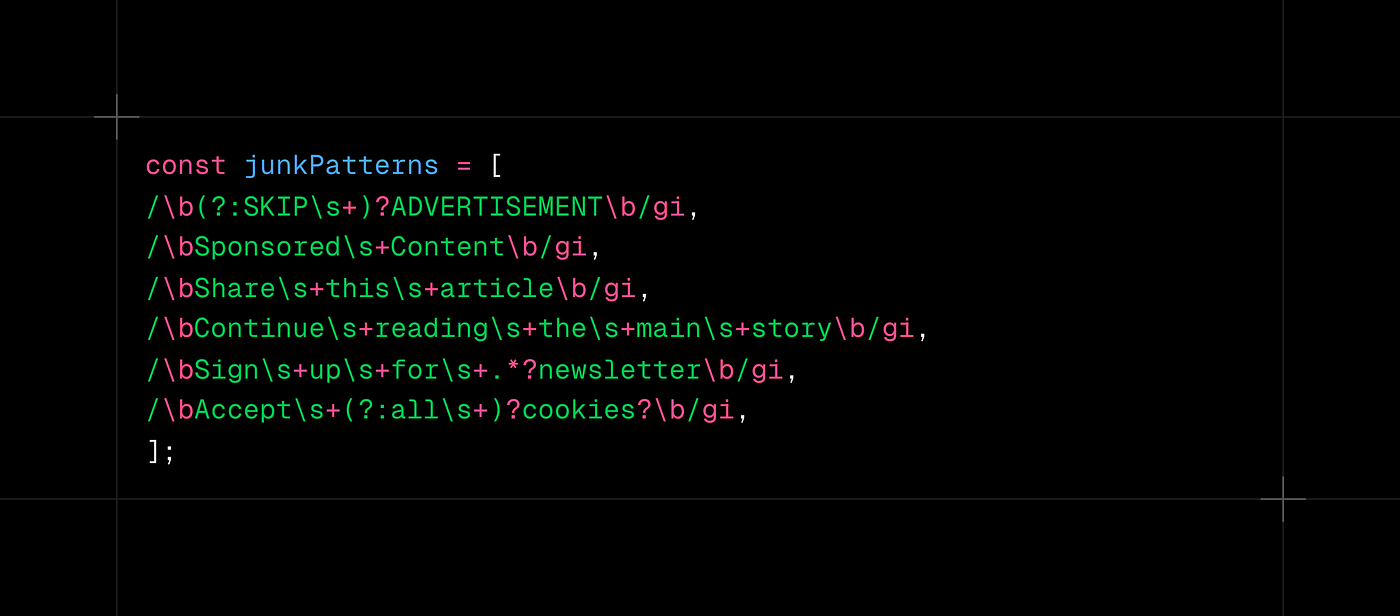
The chunk splitter respects sentence boundaries and only breaks mid-sentence when one exceeds the 1,800-character limit. That happens in legal documents and academic papers. Force-splitting on word boundaries handles those edge cases without producing garbled audio.
What I would build differently
Start with bounded concurrency, not add it after. My first production deployment had no concurrency limits. It survived exactly 4 hours before a traffic spike caused an OOM.
Use frame-accurate duration from day one. The word-boundary-based duration estimate seemed "close enough" in testing. It was off by 200 to 500ms per chunk, barely noticeable for 2 chunks and completely wrong for 15. I wasted a week debugging "highlight drift" before realizing the duration source was the problem, not the sync logic.
Do not build the provider abstraction upfront. I originally planned a clean TTSProvider interface before writing a single API call. Then I switched providers three times, and the actual variation points were completely different from what I predicted. Build the abstraction after your first migration, when you know what actually changes.
Test on real iPhones in your CI. The Xing header bug, RAF stopping at chunk boundaries, and spurious "ended" events never appeared in Chrome DevTools device emulation. If half your traffic is mobile, you need a real device in the loop.
The numbers
After all this engineering, the system runs comfortably at scale:
- Cache hit rate: ~60% at the article level (popular articles get replayed)
- Cost reduction: 60% lower than the naive "generate everything, cache nothing" approach
- Memory footprint: 150 to 250MB steady state on a 4GB server
- Zero OOMs since adding bounded concurrency (it has been months)
What this taught me
Features that sound simple ("add a play button," "add a chat sidebar") are icebergs. The UI is 10% of the work. The other 90% is making it survive load, work across browsers, and cost less than the revenue it generates.
The interesting part of systems engineering is never the happy path. It is the interaction between layers: how an MP3 metadata format designed in the 1990s collides with a mobile browser's audio pipeline, how a cache key versioning scheme prevents silent corruption, how an AbortSignal threaded through five function calls saves money you never see on an invoice.
If you are building something similar, start with bounded concurrency and two-level caching. Add real device testing to your CI. And always check what happens when your cache is cold and 100 users hit the same endpoint simultaneously.
The code is not perfect. But it works at scale, it degrades gracefully, and it does not melt the server. Sometimes that is the entire point.